





Many PCB errors originate in the component libraries rather than the schematic or layout. Yes, errors do occur there too, but let’s not overlook our libraries.
A symbol with a wrong pin assignment, a footprint copied from an old project, a part nobody realised went EOL six months ago, these issues survive DRC, pass review, and show up as a failed first power-on or costly respin after fabrication.
For a single engineer working solo, a local library is manageable. For a distributed hardware team, it’s a liability. This article covers how moving from local, engineer-owned libraries to a governed, centralised component data system reduces the error classes that cause the most expensive rework.
Library errors: the bugs your DRC will never catch
Library errors are more common than most teams realise. What makes these types of errors especially troublesome is the fact that they are usually caught at the last stages of development, where it’s most expensive. A footprint that doesn’t match the physical package, a symbol with incorrect pin assignments, a component that went EOL months ago and nobody flagged it; none of these trigger DRC or ERC.
The root cause is usually the same: engineers are working from their own local libraries, or from a shared drive that nobody governs. Parts accumulate, diverge, and slowly become unreliable, with no one on the team having a systematic way to know it’s happening.
Why local and shared drive libraries fail at scale
A local library can work fine if it’s just a single engineer managing their own library. But what happens when teams grow? Projects multiply, and design responsibility gets distributed across teams and sites.
- No version control. When a footprint gets updated in one engineer’s library, nothing propagates. Other engineers keep using stale data, and there’s no audit trail to trace when, who, or why the change was made
- Pin mapping errors surface too late. Without validation at the library level, pin mapping mistakes in a schematic symbol survive until the board is first turned on. That means respins, expedited fab, and a delayed schedule. These errors cost orders of magnitude higher than if we were able to catch them during the component definition
- Duplicate parts multiply silently. Engineers under deadline pressure create new library entries rather than hunting for an existing one. The library accumulates near-identical components with subtle differences. Inconsistent usage across designs creates sourcing and assembly problems downstream
- Shared drives add visibility without governance. Giving everyone read/write access to a shared folder solves the distribution problem, but in doing so it creates another one: anyone can overwrite a component definition, and no one is accountable. File-level locking is a poor substitute for a real review workflow
What should a managed PCB component library include beyond the schematic symbol and footprint?
A component record that only stores a schematic symbol and a PCB footprint is not a managed library but rather a drawing archive. This is where many teams underinvest. When defining a component for a managed database, components should include:
- Schematic symbol, with validated pin assignments, pin types, and electrical attributes
- PCB footprint, including all needed layers, like courtyard, silkscreen, and assembly layer data
- 3D model for ECAD/MCAD collaboration, validation, and enclosure design
- Supplier and MPN data, at least one primary supplier with an MPN, ideally two or three approved alternates
- Lifecycle status updated from supplier feeds, not manually
- Parametric data, like tolerance, operating range, package, and other filterable attributes
- Revision history (who changed what, when, and why) with rollback capability
- Compliance data, including RoHS, REACH, and other regulatory flags embedded in the component record
When all of this lives in one managed database, engineers can stop hunting for datasheet details during design and stop maintaining additional spreadsheets to track the component statuses. The library should become the system of record, not a starting point for further research.
Centralised library management with Altium
Altium takes a Cloud-workspace approach where the managed component library is part of the same environment as the design tool. Components carry lifecycle states, revision history, supplier data, and access controls that are enforced live inside Altium Designer. When a component is released to the workspace, it becomes immediately available across all connected projects and team members, without the need for a manual sync.
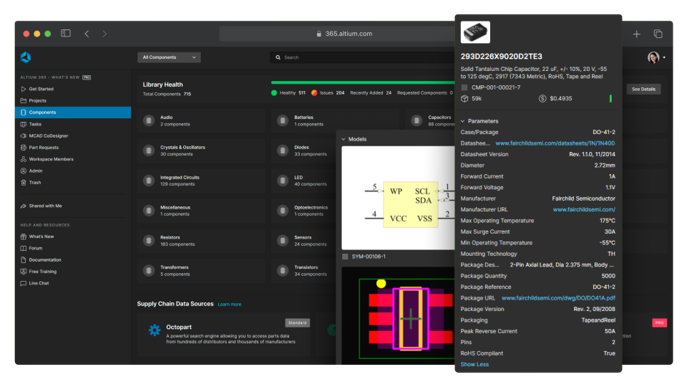
Centralised component libraries reduce design errors across hardware teams by ensuring every engineer pulls from the same approved, versioned component library. Because every component goes through a managed approval process before it enters the library, footprint inconsistencies, pin assignment mismatches, and outdated parametric data are far less likely to reach a design.
When it comes to component data integrity, Altium has placed several safeguards. One of those is role-based access control, which you can configure to prevent unauthorised edits to released components. Designers can place approved parts but can’t modify the underlying definitions.
Lifecycle-based release workflows create a structured gate between component creation and team-wide availability. A component stays in a draft state until it moves through defined lifecycle states, with a formal approval step required before it becomes available to the team. It’s at these approval stages that those hard-to-find errors, like pin mapping, can get caught. Without these approval stages, bad component data, obsolete parts, and parts without supplier data can move straight into active designs.
Version control runs an electronically intelligent version of Git under the hood, meaning every change to a component definition has a full audit trail and prior revisions are recoverable. When a component is updated, whether a footprint, lifecycle status, or otherwise, that information is then available to all engineers working in the connected environment.
Enterprise PCB tools handle component library version control and access permissions through lifecycle states and role-based controls. In Altium, components move through defined states with permissions controlling who can trigger each transition. Every state change is logged, giving teams a full audit trail of who approved what and when.
How do I migrate my local component library into a centralised Cloud-based library system?
Migrating to a new system can be a stressful undertaking, which is why many teams push it to a later time, but when done in phases, it is quite manageable.
- Audit first. Before importing anything, catalogue every local and shared library file across the team. Identify the components actually used in current and recent designs and set everything else aside
- Deduplicate. Group near-identical components and determine which version becomes the approved definition going forward. This is the tedious part, but it’s the foundation of a library the team will actually trust
- Define roles and permissions. Decide who can create components, who approves them, and who has read-only access. This needs to be established before anyone starts importing
- Define your component templates. Decide what data fields are required for each component type. Getting this right before import means every component comes in with consistent, complete data
- Import in priority order. Start with the highest-use components
- Enforce usage at the tool level. Configure the design environment to reference only the managed workspace. Engineers should not be able to place a component that hasn’t been through the approval workflow
For teams looking to move to a managed, centralised component library, Altium provides the infrastructure to do it. Centralised library management isn’t a one-time project, but it’s the kind of foundational work that pays off on every design that follows
Frequently asked questions about centralised component libraries
What causes pin mapping errors in PCB component libraries and how do I prevent them?
Pin mapping errors are most commonly caused by a component built by one engineer with no second set of eyes, pins assigned from memory or a quick datasheet glance, with no review and no release gate before it enters the library.
The reliable fix is a mandatory validation step at the library level, where a second engineer cross-references every pin assignment against the manufacturer’s datasheet before the component is released to the team.
How do I ensure every engineer on my team is using the same approved component symbols and footprints?
Configure the design environment to reference only the managed workspace. Role-based access controls prevent unauthorised edits, and when a component is updated, it propagates to all connected projects automatically.
How do centralised component libraries reduce design errors across a hardware team?
Centralised libraries reduce design errors by ensuring every engineer pulls from the same approved, versioned component data instead of working from local or shared-drive copies that drift apart over time. Because every component goes through a managed approval process before it becomes available, footprint mismatches, pin assignment errors, and outdated parametric or lifecycle data are caught before they reach a design rather than after fabrication. Role-based access control prevents unauthorised edits to released components, and a full revision history gives teams an audit trail of who changed what, when, and why. The result is fewer of the error classes that survive DRC and ERC but still cause failed power-ons or costly respins.